Simplify
Remove unnecessary steps, decisions and handoffs.
WE IMPROVE OPERATIONS AND DECISION FLOWS
If a process depends on copy-pasting data, manual checks, email chains, spreadsheets and workarounds, we first find where time and money are actually leaking. Only then do we choose the simplest solution that removes the friction.
01 / COST OF THE STATUS QUO
The problem does not have to look like a failure. More often it is an hour here, fifteen minutes there, copying between systems, manual checks and knowledge locked in one person’s head. At scale, these small frictions become operating cost.
We do not invent ROI. Enter your own numbers and see the scale of the problem before discussing a solution.
The calculator does not promise savings. It only shows the cost of the current way of working based on your inputs.
02 / WHEN NOT TO BUILD
If a process change, a spreadsheet or an off-the-shelf integration solves the problem, that is what we recommend. Custom software only makes sense when simpler options cannot deliver the goal.
Remove unnecessary steps, decisions and handoffs.
If a good solution already exists, there is no reason to rebuild it.
APIs, synchronization and automated data flow often solve most of the problem.
Workflows, RPA or backend services take over repetitive rules and manual operations.
Custom software, agents, vision or models only when they create a clear advantage in the process.
03 / THE REAL GOAL
We ask what should change in the way the company works. Technology only appears as the mechanism that creates that outcome.
Specialists should not spend their day copying, cleaning and repeatedly checking data.
The process should move from input to decision without waiting for manual handoffs between people and systems.
Repeatable criteria, data validation and automated checks reduce the cost of rework and inconsistencies.
The process outcome should be visible, measurable and traceable — not hidden in inboxes and local files.
04 / HOW WE WORK
Each step is designed to reduce the risk of a bad investment: from understanding the problem, through choosing the simpler route, to measuring the result.
Who does what, in which system, with what data, and where waiting, manual work or risk appears.
Time, people involved, errors, delays, additional checks and the cost of scaling the current way of working.
We remove steps that do not create value. We do not automate chaos just because it is possible.
Off-the-shelf tool, integration, automation, custom application or AI — in the order that makes sense.
We validate the key assumption first. Only then do we expand the solution and connect it to operations.
Did process time fall? Are there fewer manual steps? Is the outcome more predictable? That is the benchmark.
05 / SELECTED WORK
Each case study answers five questions: what happened before, what hurt, what changed, what the new process looks like and why it matters to the organisation.
Working with large volumes of legal documents meant manually preparing content, protecting sensitive data and repeatedly checking material before it could be used downstream.
Documents contain PII, while still needing to preserve the structure and context required for downstream work.
Manual anonymisation and preparation is slow, prone to omissions and difficult to scale.
We designed a pipeline that detects and pseudonymises sensitive data locally before content reaches the LLM, then verifies the output and, when needed, restores the data locally.
Ingest → pseudonymisation → model processing → verification → human-in-the-loop for uncertain cases → output with a complete audit trail.
The result is not a “chat with a document”, but a repeatable process that recovers tens of hours of work each week while keeping control over sensitive data.
FastAPI · PostgreSQL · token vault · Regex/NER · LLM · verifier · reidentifier · asynchronous worker · audit log · React/Vite · Docker.
The visual is an original architecture reconstruction. It does not show client documents or data.
Across multiple production lines, OK/NOK detection alone is not enough. The result must be repeatable, recorded and comparable across locations, shifts and time.
Quality control covered 17 production lines and required a consistent way to record the result.
Without one digital standard, it is harder to compare results, trace deviations and build data for process improvement.
The computer-vision layer turns image observations into a standardised quality result that can be stored and used downstream in the quality process.
Image → detection → OK/NOK result → record → traceability → analysis over time.
The value does not end with automated detection. It creates a common control standard across 17 lines and data that can be analysed and improved over time.
Due to NDA restrictions, we do not publish workstation photos, production data or the client interface. The visual below is an abstract representation of the inspection architecture.
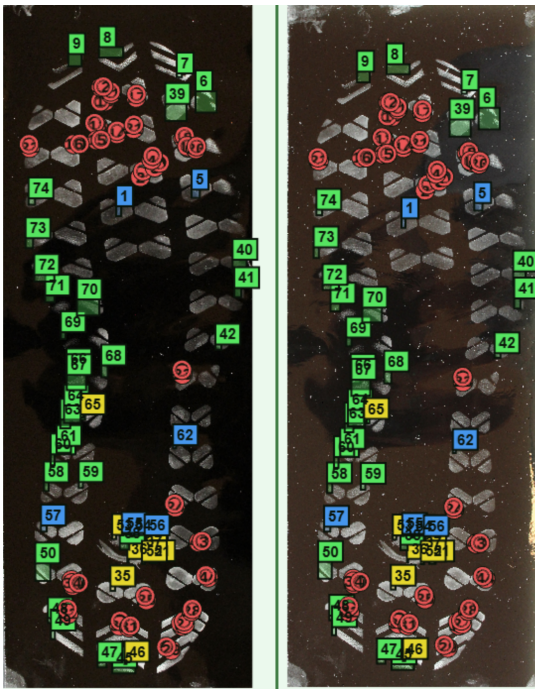
Contribution to Forensic Biometrics Studio — a desktop application for side-by-side forensic image comparison, marking corresponding features and creating structured comparison material.
An expert works with two images at once and must preserve annotation precision while panning and zooming.
New annotation types require consistent drawing, mouse handling, visibility, translations, shortcuts, and save/load behaviour.
Extending annotation classes and handlers, drawing logic that accounts for viewport positioning during zoom, and integration with the toolbar, shortcuts and annotation serialisation.
Load images → mark corresponding features → compare → save data → generate structured material for further work.
Software should support the expert’s workflow rather than force the expert to work around interface limitations. The value is a precise tool and a repeatable analysis workflow.
R&D / ENGINEERING
We separate R&D from client case studies. This section shows the ability to build and test solutions where there is no ready-made answer.
A virtual try-on pipeline designed around preserving the person’s identity and the input image: garment classification, clothing parsing, generation only inside the mask and a hard freeze outside it.
A prototype combines temperature, humidity, light and soil-moisture sensors with local logic controlling doors, irrigation and feed dosing. Data is sent to InfluxDB while decisions can be executed locally.
06 / WHERE TO LOOK FOR LEVERAGE
You do not need to know what solution you need. It is enough to recognise one of these kinds of friction.
Extraction, classification, validation, document generation, workflow and sensitive data.
Reporting, controlling, document matching, statuses, rules and controls.
Workflows, integrations, repetitive decisions, recurring tasks and data handoffs.
Computer vision, sensors, automation, traceability and engineering tools.
Data synchronization, APIs, ERP/CRM, automated import/export and removal of copy-paste.
Search, RAG, classification, structured knowledge repositories and decision-support tools.
Custom tools, forms, dashboards, roles, audit trails and integrations with the existing environment.
CAD/Python tools, calculation automation and logic embedded where the engineer actually works.
07 / REDUCING DECISION RISK
We do not start by quoting an “AI implementation”. We first check whether the problem is worth building a solution for at all.
PROCESS DISCOVERY
Process and bottleneck analysis, 2–3 improvement directions, assessment of where automation makes sense and a recommendation for the next step. If we proceed to a project, PLN 150 is credited against the first invoice.
Payment via Stripe. Choose a time after payment.START WITH THE PROCESS
You do not need to know whether you need AI, an integration or an application. Describe the current way of working and the outcome that would matter.